Credit card recommendations for each purchase
See which card fits the purchase in front of you
Quick answer: Which Card ranks the cards in your RewardSensei wallet for a recognized merchant or selected category using reward rates and your saved point values. It can exclude cards with foreign transaction fees. Listed reward caps and household owner labels appear as context. When you compare only your own cards, a merchant search can also show matching synced offers. Results are estimates because merchant coding and issuer terms control the rewards you actually receive.
The right answer can change between a coffee shop, a flight, and a purchase abroad. Search for the merchant or choose a category to compare the cards you already carry and see why one appears ahead of another.
Availability: Which Card is included on Free and Pro. Household comparisons are available when you belong to a household and the relevant cards are shared. Creating a household requires Pro, while invited Free members can join and use allowed shared views.Current distribution: The web app is generally available; Chrome, Firefox, and Edge extensions are live; Safari is available on Mac (macOS 13.3 or later); Android is available on Google Play; the iPhone app is awaiting store approval.
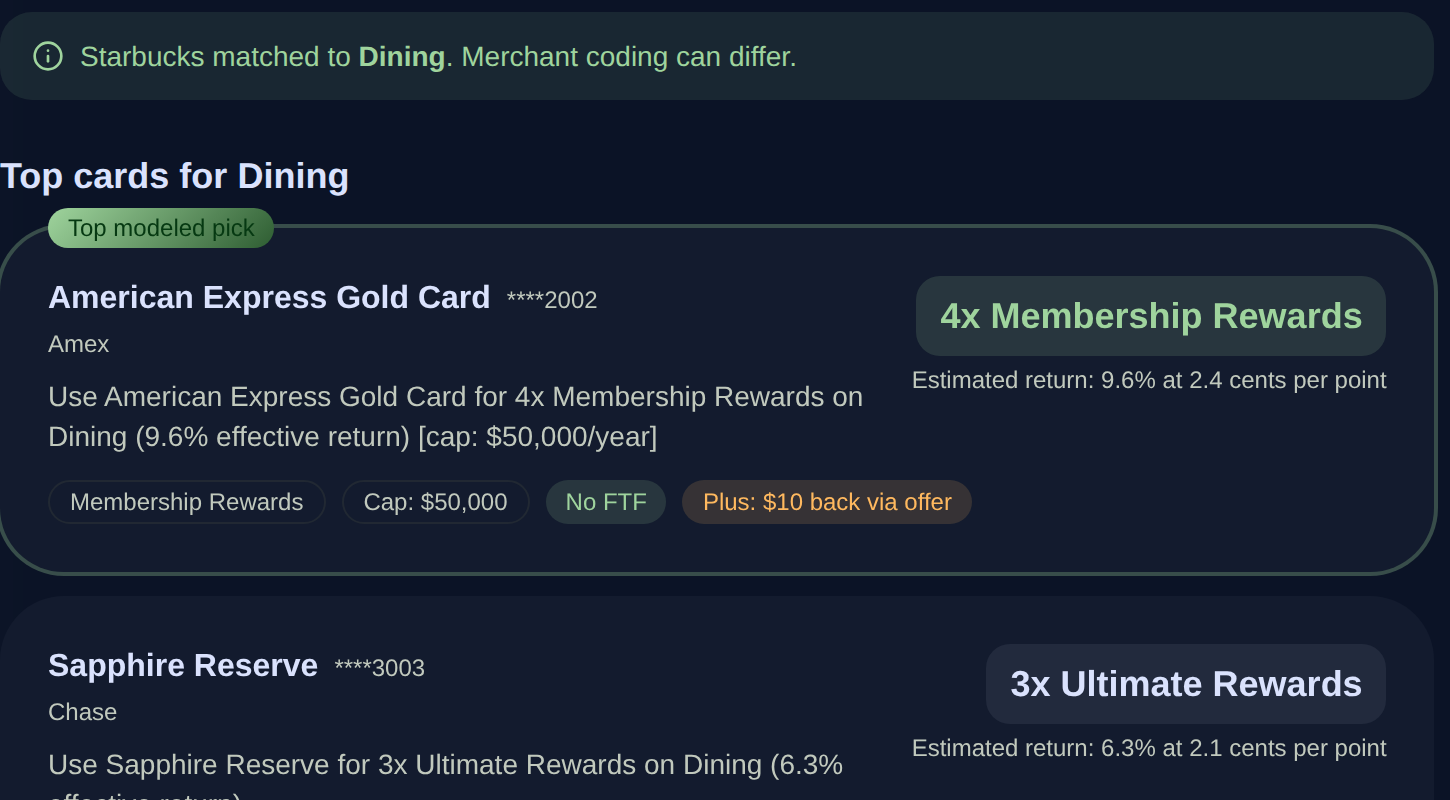
What Which Card does
Merchant and category search
Enter a merchant such as Starbucks or choose a spending category such as dining, groceries, gas, or travel.
Comparable reward estimates
See the modeled return for each card using its reward rate and the point-value assumptions saved in RewardSensei.
Matching active offers
When you compare only your own cards and a synced active offer matches the merchant you searched, see that potential value beside the card. The issuer’s eligibility and purchase terms still apply.
Caps and earning conditions
See rotating categories, reward caps, and other listed conditions that may affect the earning rate.
International purchase filter
Mark a purchase as international to exclude cards listed with foreign transaction fees, then confirm the current card terms before paying.
Household owner labels
Compare allowed shared card products and see the associated household owner labels. If more than one member holds the same product, confirm the physical card before paying.
How it works
- 1
Add the cards you carry
Choose the cards you carry or add a custom card, then keep point-value assumptions current.
- 2
Sync offers when useful
Use the browser extension to sync eligible offers from supported issuers. A merchant search can include a matching active offer when you compare only your own cards.
- 3
Enter the purchase
Search for a merchant or select a spending category. Turn on the international filter when the purchase is outside the United States.
- 4
Compare the explanation
Review the modeled return, reward rate, point value, offer, cap, fee details, and owner label before choosing a card.
- 5
Confirm the terms
Check merchant coding, enrollment requirements, reward caps, exclusions, and current issuer terms when the difference matters.
Which Card FAQ
Is Which Card included on the Free plan?
Yes. Free and Pro members can use Which Card with unlimited cards. Pro is required to create a household, while an invited Free member can join and use allowed shared views.
How does Which Card rank credit cards?
It ranks cards using listed reward rates and your saved point values. The international-purchase filter can exclude cards with foreign transaction fees. Listed reward caps and household owner labels appear beside the ranking as context. When you compare only your own cards, merchant searches can also show matching synced offers. Those details do not currently change the sort order. The result is an estimate, not a guaranteed return.
Does Which Card know how a merchant will code the purchase?
It maps recognized merchants to a likely spending category. A merchant or payment processor can code the purchase differently, so the issuer’s final category and terms control the rewards earned.
Can Which Card include a card-linked offer?
Yes. When you compare only your own cards, a merchant search can include a matching active offer that has been synced to RewardSensei. Category-only results do not currently include matching offers. The issuer’s eligibility and purchase terms still apply.
How does Which Card handle international purchases?
The international-purchase filter excludes cards listed with a foreign transaction fee. Confirm the current fee and any country or merchant restrictions in the card’s terms before paying.
Can Which Card compare cards from another household member?
Yes. In household mode, it can compare card products that members have allowed into shared views and show the associated owner labels. If more than one member holds the same product, confirm which physical card you intend to use.
Try RewardSensei with your own cards
Add unlimited cards and use Which Card on Free. Pro is not required for purchase recommendations.
Related guides and features
Offer sync and activation
Sync available offers that can add context to a merchant recommendation.
Learn moreHousehold Hub
Compare participating household cards while keeping each owner visible.
Learn moreRewardSensei pricing
See what stays free and what deeper Pro guidance adds.
Learn moreBenefit tracker
See recurring card credits, current usage, eligible merchants, and reset periods in one credit card benefits tracker.
Ask Sensei
Compare estimated rewards, recorded benefit value, and annual fees before renewal. Free includes a preview; Pro adds complete portfolio guidance.
TripScope
Plan a trip with card picks, unused travel credits, airport lounges, insurance, and supported dining options from your RewardSensei wallet.
Award Readiness
With Pro, see each person's points, miles, hotel status, and free-night certificates beside a saved TripScope trip, plus how many transfer options are listed.