Credit card portfolio and renewal analysis
Review whether each card is earning its place
Quick answer: Ask Sensei helps you review a credit card portfolio using estimated rewards, supported spending-category data, recorded benefit usage, and annual fees. Free shows a limited spending and keep-or-cancel preview. Pro adds complete card analysis, category gaps, new-card considerations, retention paths, and conversational guidance.
A large benefits list does not answer whether you used enough of it to justify another annual fee. Ask Sensei shows the value assumptions and recorded usage behind each estimate, so you can review the tradeoffs before the renewal date.
Availability: Free includes a spending overview, up to five spending categories, and up to three keep-or-cancel results after supported spending-category sync. Pro adds complete analysis across your cards, new-card considerations, category gaps, retention paths, and conversational guidance from Ask Sensei.Current distribution: The web app is generally available; Chrome, Firefox, and Edge extensions are live; Safari is available on Mac (macOS 13.3 or later); Android is available on Google Play; the iPhone app is awaiting store approval.
What Ask Sensei does
Spending by category
Review estimated annual spending by category after the browser extension syncs supported, derived spending-category totals.
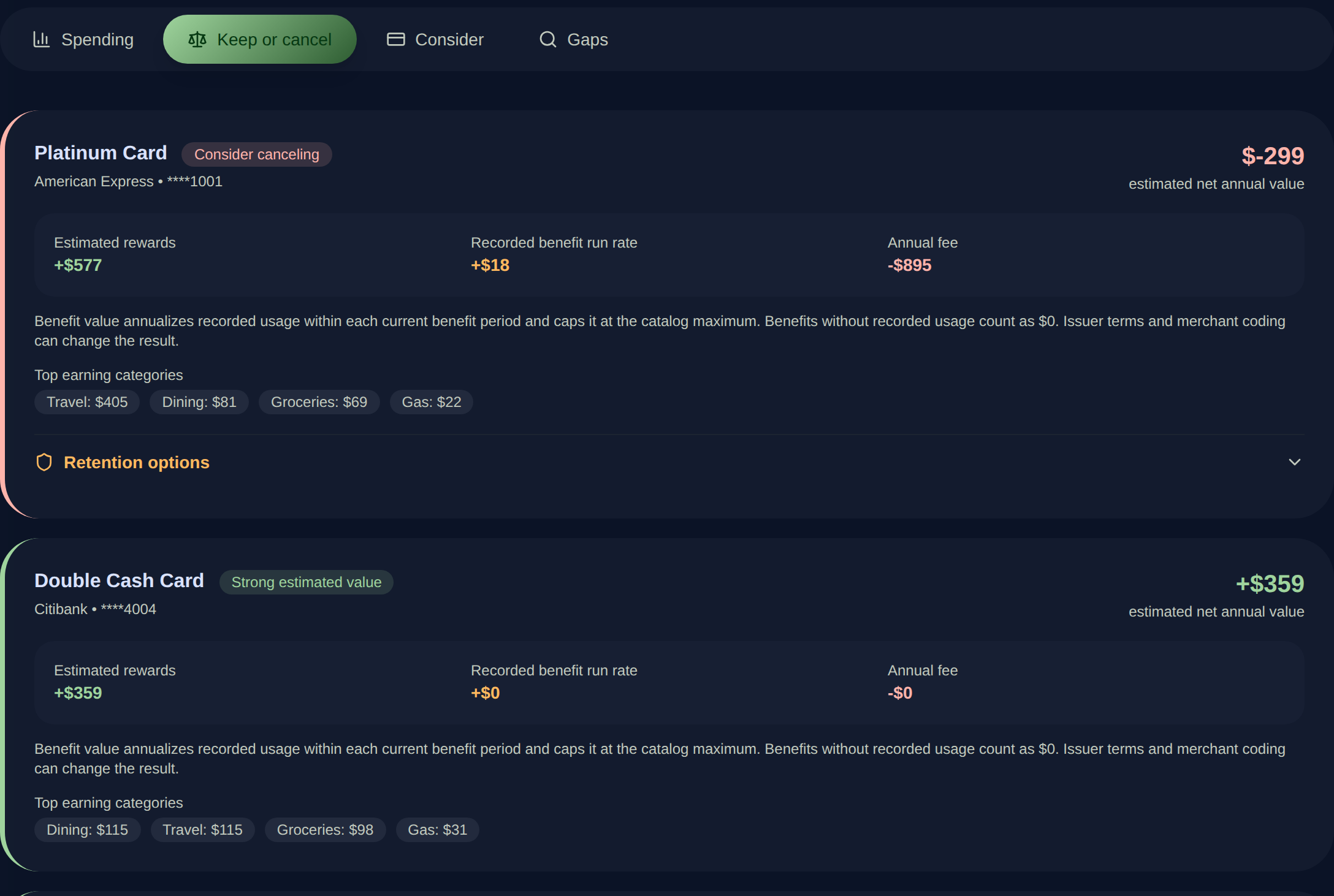
Keep-or-cancel estimates
Compare estimated rewards and recorded benefit run rate with the annual fee for each card included in the analysis.
Recorded benefit value
Base benefit value on usage recorded in the current benefit period. Benefits without recorded usage count as zero in the estimate.
Visible assumptions
See the reward, benefit, fee, point-value, and cap inputs that shape an estimate before relying on its direction.
Portfolio gaps and card considerations
With Pro, review spending categories with weaker coverage and cards that may fit the spending profile you supplied.
Retention and downgrade paths
With Pro, explore a retention plan and possible product-change paths when a card’s estimated value needs a closer look.
Ask Sensei
With Pro, ask a question grounded in the wallet and available portfolio context, then review the underlying facts before acting.
How it works
- 1
Add cards and current fees
Keep the wallet, annual fees, and relevant card details current so each review starts with the cards you actually hold.
- 2
Sync supported spending categories
Install the browser extension and sign in on a supported issuer website to sync derived spending-category totals. Raw transaction descriptions stay in extension storage.
- 3
Record benefit usage
Mark benefits used as they happen. Ask Sensei annualizes recorded usage within the current benefit period and caps it at the listed maximum.
- 4
Review the estimate before renewal
Compare estimated rewards and benefit value with the annual fee, then inspect the categories and assumptions behind the result.
- 5
Confirm account-specific consequences
Check the current fee, issuer terms, product-change options, points consequences, and renewal date before changing or closing an account.
Ask Sensei FAQ
What does Ask Sensei include on the Free plan?
After supported spending-category sync, Free includes a spending overview, up to five spending categories, and up to three keep-or-cancel results. Unlimited card tracking still remains free elsewhere in RewardSensei.
What does RewardSensei Pro add to Ask Sensei?
Pro adds complete analysis across your cards, new-card considerations based on the spending profile, category gap analysis, detailed retention and downgrade paths, and conversational guidance from Ask Sensei.
How does Ask Sensei estimate a card’s annual value?
It combines modeled rewards from the available spending categories with the annualized value of benefit usage recorded in the current period, then subtracts the listed annual fee. Point-value assumptions, reward caps, and current card terms can change the result.
Does Ask Sensei copy raw transaction descriptions to the web app?
No. Ask Sensei uses supported, derived spending-category totals synced through the browser extension. Raw transaction descriptions stay in extension storage.
How are unused benefits treated in the estimate?
A benefit without recorded usage counts as zero. Recorded usage is annualized within the current benefit period and capped at the listed benefit maximum.
Does a keep-or-cancel result tell me to close a card?
No. It is an estimate for reviewing the tradeoffs. Confirm the annual fee, current benefits, product-change options, effect on points, credit implications, and issuer rules before making an account decision.
Are Ask Sensei estimates exact?
No. They depend on the spending categories, point values, benefit usage, fees, reward caps, merchant coding, and terms available at the time. Treat them as a starting point for a renewal review.
Try RewardSensei with your own cards
Start with the limited Ask Sensei preview on Free. Pro adds the complete portfolio analysis and personal guidance.
Related guides and features
Benefit tracker
Keep recorded benefit usage current before reviewing annual card value.
Learn moreWhich Card
Choose a card for the next purchase after reviewing the broader portfolio.
Learn moreRewardSensei pricing
Compare the limited Free preview with complete Pro guidance.
Learn moreHousehold Hub
Share cards, benefits, offers, points, and which-card recommendations across up to four household members while each person chooses what to share.
Offer sync and activation
Sync supported offers for free. Pro adds individual, eligible bulk, and opt-in automatic activation on four supported issuer sites.
TripScope
Plan a trip with card picks, unused travel credits, airport lounges, insurance, and supported dining options from your RewardSensei wallet.
Award Readiness
With Pro, see each person's points, miles, hotel status, and free-night certificates beside a saved TripScope trip, plus how many transfer options are listed.